
Let AI assistants and test suites use real phones like a human.
English •
中文文档 •
Workflow Showcase •
Quick Start •
MCP for IDEs •
Benchmarks •
Discord Community






Live Demo: Setup driving routes and calculate total durations in Google Maps, then open YouTube to play a Coldplay song.
## Key Highlights
* **Cross-App Automation & Autonomous AI Assistant**: Operates not just as a robust testing framework, but as an autonomous agent capable of handling complex cross-app workflows and daily tasks via natural language;
* **Zero-Maintenance Test Automation**: Built upon a "Dynamic-First, Coordinate-Fallback" multimodal locating engine, eliminating fragile XPath/ID selector maintenance and remaining resilient to UI redesigns, system updates, and resolution drift;
* **One-Click Bug Repro & Logcat Diagnostics in IDE**: Native **Model Context Protocol (MCP)** integration allows **Antigravity, Claude Code, and Windsurf** to drive physical test devices via natural language, automatically capturing crash stacks from **Logcat** and keyframe screenshots;
* **Ultra-Fast Execution (3–5s per Step)**: Pioneered an **Optimistic Asynchronous Pipeline** that completely decouples UI interaction from heavy LLM reasoning, achieving rapid regression throughput in Flash mode;
* **Popup Self-Healing & 10+ Hour Exploration**: Proprietary **Safety Net** double-checks targets before action execution to intercept and clear interfering system popups; Pro mode supports **10+ hours** of continuous exploratory & monkey-plus stability testing;
* **Industry-Leading SOTA**: Achieved **99%+ task completion** on Google Research's **AndroidWorld** benchmark (100+ complex multi-step tasks).
## Antigravity × ARTEMIS: Autonomous Testing Workflow
Experience seamless collaboration between **Antigravity** and **ARTEMIS** via native MCP integration — taking you from a natural language requirement to a production-grade diagnostic report in four automated steps:
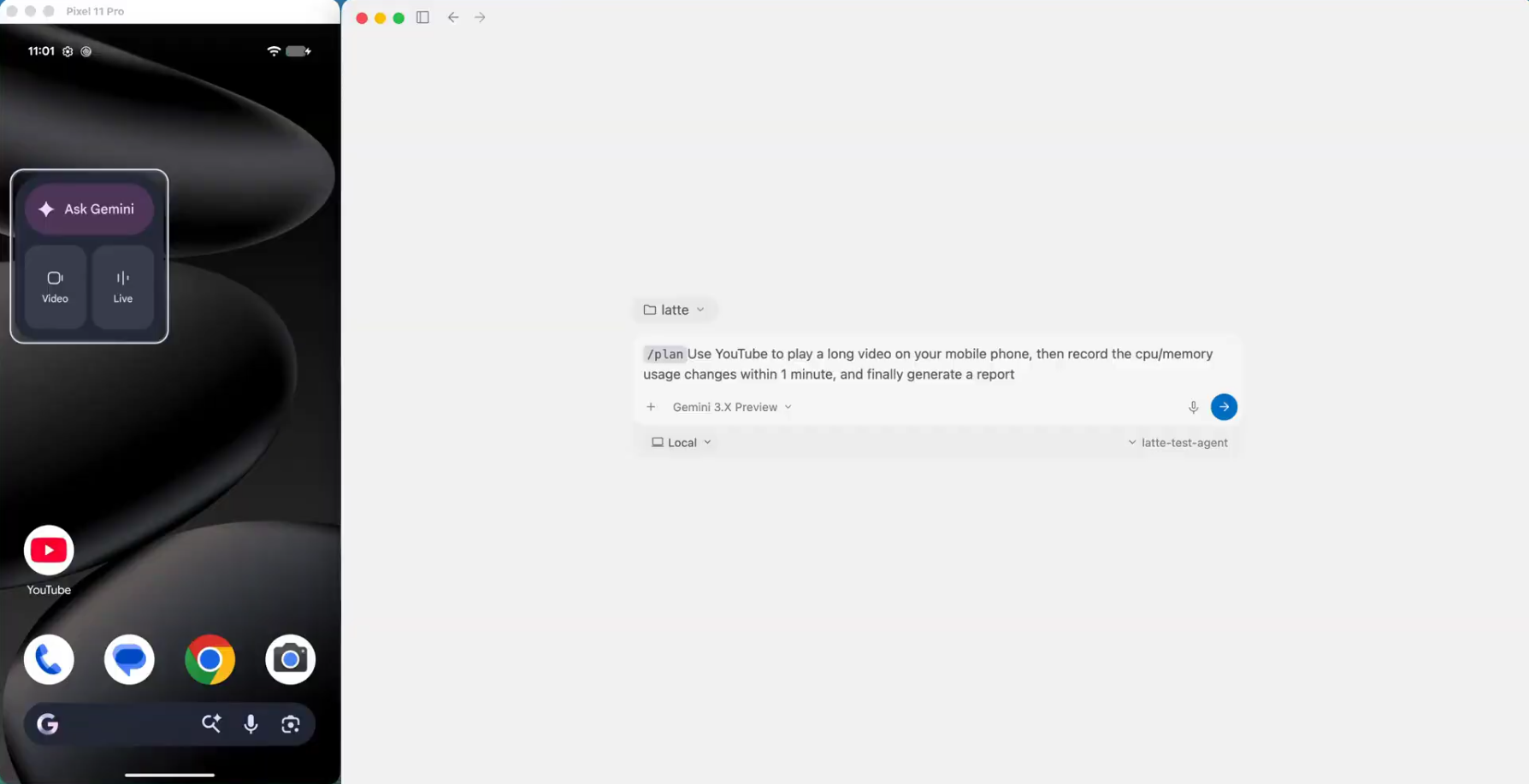
1. Prompt Input (Task Dispatch)
Describe your test scenario and target metrics in Antigravity
|
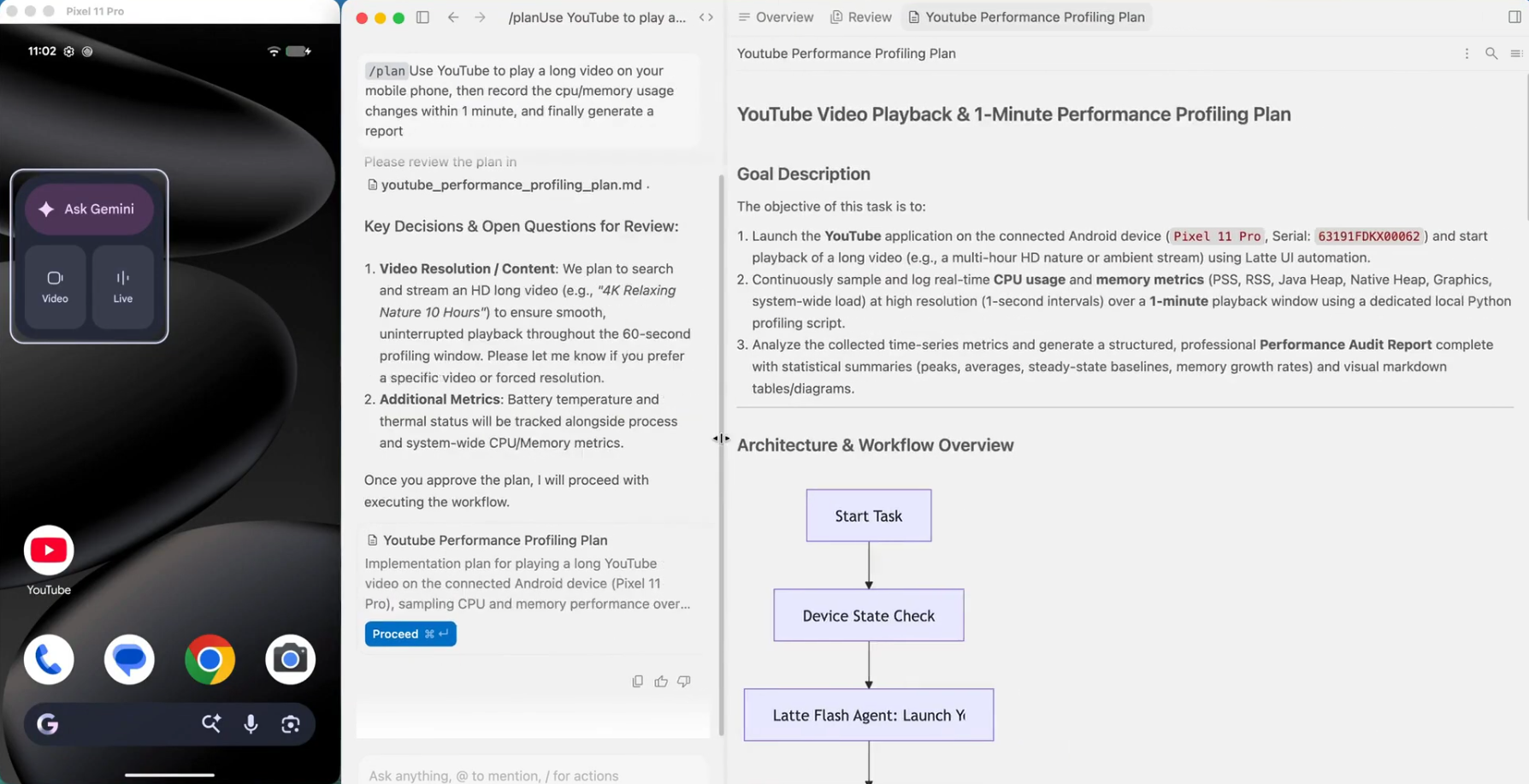
2. Test Plan Generation
Formulates a step-by-step test plan & architecture for review
|
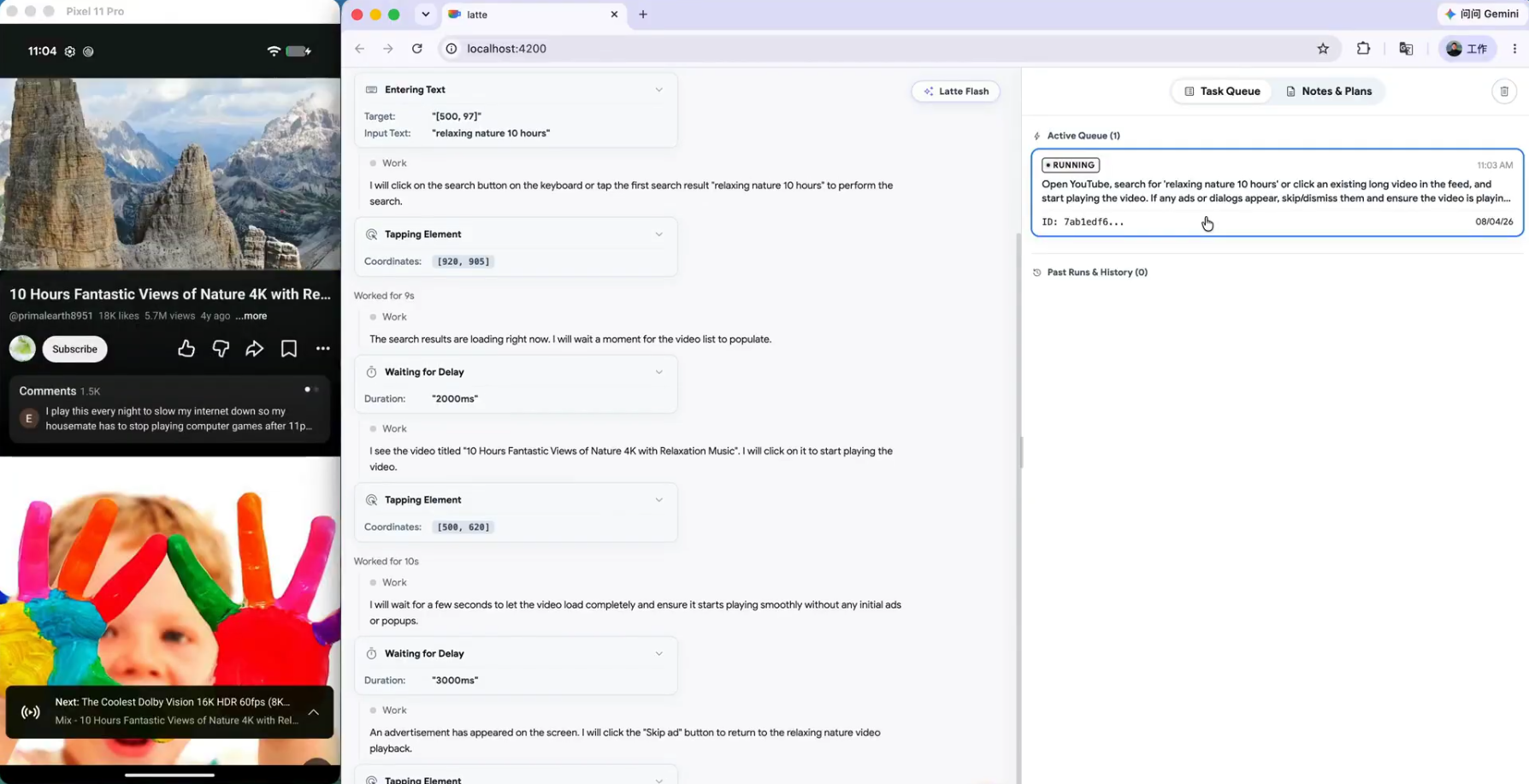
3. Autonomous Test Execution
Drives real device, navigates UI, and profiles performance
|
4. Comprehensive Final Report
Delivers structured audit findings, metric tables, and raw datasets

|
## Quick Start
Ensure an Android device (with **USB Debugging** enabled) or emulator is connected. The one-click startup script will automatically:
- **Install System Toolchains**: Detect and auto-install ADB, scrcpy, FFmpeg, and Python (`uv`) dependencies.
- **Mount Global MCP Server & AI Agent Rules**: Prompt to automatically install global MCP configurations and the **Artemis Mobile Testing Mindset (`rules.md`)** into your AI IDEs (**Antigravity**, **Cursor**, **Claude Code**, **Codex**, **Windsurf**, **VS Code**, **Cline/Roo**, **OpenClaw**).
### macOS and Linux
```bash
# 1. Clone repo & navigate to directory
git clone https://github.com/google/artemis.git && cd artemis
# 2. One-click launch
./start.sh
```
### Windows PowerShell
```powershell
# 1. Clone repo & navigate to directory
git clone https://github.com/google/artemis.git
cd artemis
# 2. One-click launch
.\start.bat
```
> PowerShell does not search the current directory for executable scripts by default, so use `.\start.bat` without a trailing `\`. In Command Prompt (CMD), use `start.bat` instead.
> **Tip**: Opens `http://localhost:8000` in your default browser with a device connection wizard, live screen mirroring, prompt sandbox, and execution replays. You can also run directly from CLI: `uv run artemis run "Open Settings, find Battery and tell me current level" --profile flash`.
MCP Setup for Codex / Antigravity / Claude Code / Windsurf (Click to expand)
ARTEMIS includes a native **Model Context Protocol (MCP)** server. Connect your real phone directly into AI IDEs:
### 1. One-Click Auto Install (Recommended)
Running `./start.sh` (macOS/Linux) or `.\start.bat` (Windows PowerShell) will prompt you to configure global MCP and testing rules for detected IDEs (or you can install/update anytime later manually using the commands below):
```bash
# Auto-install MCP server & global rules for Antigravity / Jetski:
uv run artemis mcp --install antigravity
# Or install for all supported AI IDEs (including Codex):
uv run artemis mcp --install all
```
> **Tip**: You can also configure MCP interactively during first-time setup via `uv run artemis init`.
> **Pro Tip**: If you want to use the `artemis` command globally without `uv run` in any directory, run `uv tool install -e .` once in the project root.
### 2. Manual Configuration (Optional)
If you prefer to configure manually, run `uv run artemis mcp --generate-config ` (for example, `codex` or `antigravity`) to output the appropriate TOML or JSON snippet. Replace `/path/to/artemis` with your actual repo path and point `command` to your `.venv` Python executable:
* **Codex** (`~/.codex/config.toml`):
```toml
[mcp_servers.artemis]
command = "/path/to/artemis/.venv/bin/python"
args = ["-m", "mcp_server"]
cwd = "/path/to/artemis"
[mcp_servers.artemis.env]
PYTHONUNBUFFERED = "1"
PYTHONPATH = "/path/to/artemis"
```
* **Antigravity** (`~/.gemini/jetski/mcp_config.json`):
```json
{
"mcpServers": {
"artemis": {
"command": "/path/to/artemis/.venv/bin/python",
"args": ["-m", "mcp_server"],
"cwd": "/path/to/artemis",
"env": {
"PYTHONUNBUFFERED": "1"
},
"tools": {
"mobile_run_task": { "eager": true },
"mobile_manage_task": { "eager": true },
"mobile_get_device_state": { "eager": true },
"mobile_inspect_trace": { "eager": true }
}
}
}
}
```
* **Claude Desktop** (`claude_desktop_config.json`):
```json
{
"mcpServers": {
"artemis": {
"command": "/path/to/artemis/.venv/bin/python",
"args": ["-m", "mcp_server"],
"cwd": "/path/to/artemis"
}
}
}
```
### 3. Mount Behavioral Rules for AI Agents (Highly Recommended)
To ensure your AI coding assistant acts with the rigor of a senior mobile test engineer and never hallucinates UI interactions, we provide a dedicated testing mindset rules file at [`mcp_server/rules.md`](./mcp_server/rules.md) (covering **Active Exploration before coding**, **Flash vs. Pro routing strategy**, **Latency & Timing compensation**, and the **"Dynamic-First, Coordinate-Fallback" locator pattern**).
You can mount or copy [`mcp_server/rules.md`](./mcp_server/rules.md) into your AI IDE's rule configuration:
* **Antigravity**: Add the contents of `rules.md` to your Workspace Rules, Global Rules settings, or agent instructions.
* **Claude Code**: Run `artemis mcp --install claude` to install the rules to `~/.claude/rules/artemis.md` (install to exactly one location — Claude Code loads both `~/.claude/CLAUDE.md` and `~/.claude/rules/*.md`, so duplicating the rules wastes context).
* **Cursor**: Copy the contents into `.cursorrules` or create a rule file at `.cursor/rules/artemis.mdc`.
* **Codex**: Add the contents to `~/.codex/AGENTS.md` (or the active `AGENTS.override.md`).
* **Windsurf / OpenClaw**: Add the rules to your workspace rules or global system prompts.
> For more details on the testing mindset and MCP architecture, see the [MCP Server README](./mcp_server/README.md).
### 4. Prompt Your Phone in the IDE Chat
In Codex, Antigravity, or Claude Code, simply prompt:
> *"Build the latest changes into an APK, install it on the connected device, open the login screen with a test account, verify if there are any unexpected popups after login, and return screenshots of the final page."*
Python SDK Integration (Click to expand)
Embed the mobile automation engine into your Python workflows in just a few lines:
```python
import asyncio
from artemis import ArtemisClient, ConcurrencyMode
async def main():
# 1. Initialize client with optional device targeting and concurrency strategy:
# - concurrency_mode="per_device" (default): 1 task per device, allows multi-device parallel execution
# - concurrency_mode="global": 1 task globally across all devices
client = ArtemisClient(
device_serial="emulator-5554", # optional: target specific device serial
default_profile="flash", # "flash" (fast reactive) or "pro" (deep reasoning)
concurrency_mode="per_device", # or ConcurrencyMode.GLOBAL
)
# 2. Execute natural language end-to-end test case (can also override device per-run)
result = await client.run(
"Open System Settings, go to 'Battery', verify battery percentage is displayed, and check for any crash dialogs.",
device_serial="emulator-5554", # optional: override target device for this specific run
)
# 3. Structured assertions & execution tracing
assert result.status == "SUCCESS", f"Test failed: {result.error}"
print(f"✅ Test Passed! Device: {result.device_id} | Turns: {result.turns} | Trace ID: {result.trace_id}")
if __name__ == "__main__":
asyncio.run(main())
```
## Usage Modes
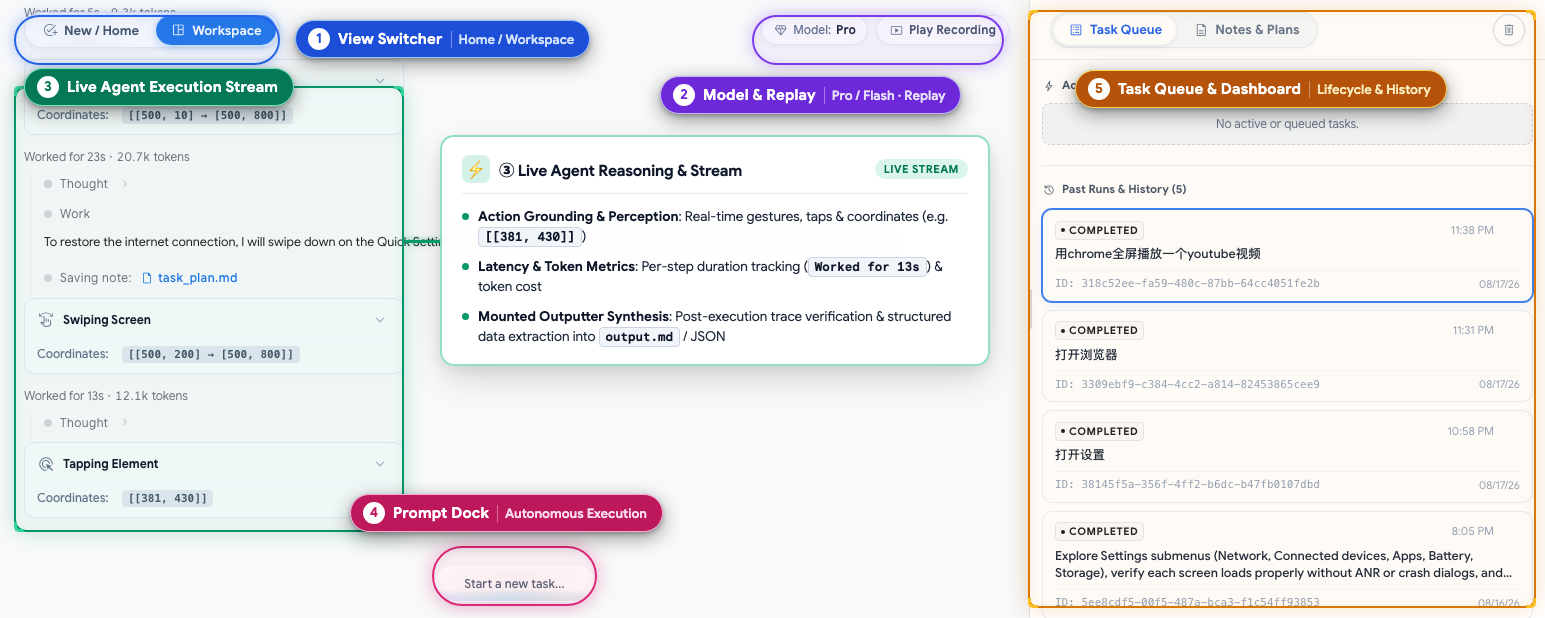
Console Overview: ① View Switcher (Home / Workspace) · ② Model & Replay (Flash/Pro status & video replay) · ③ Live Agent Stream (Action perception, target coordinates & structured results) · ④ Prompt Dock (Natural language dispatch) · ⑤ Task Queue & Dashboard (Lifecycle & history)
* **Web Visual Test Console (`uv run artemis ui`)**: Real-time screen projection and interactive panel, supporting natural language test dispatch, live reasoning telemetry, action trajectories, and execution replay; manage server lifecycle anytime from any terminal using `uv run artemis restart`, `uv run artemis stop`, and `uv run artemis status`;
* **Native MCP Protocol (IDE Collaboration)**: Operates as a standard MCP server seamlessly integrating with **Antigravity, Claude Code, Windsurf**, etc., directly driving real devices inside the IDE to verify bugs and run test cases;
* **Developer CLI (`uv run artemis run`)**: Direct terminal execution for automated test cases, exploratory stability inspection, or AndroidWorld benchmarks with high-fidelity structured terminal output;
* **Python SDK**: Integrates as a standard Python library into existing automated testing frameworks (e.g., pytest) or CI/CD pipelines with strongly typed Pydantic structured outputs and assertion support.
## Benchmarks: AndroidWorld (SOTA 99%+)
Evaluated on [AndroidWorld](https://github.com/google-research/android_world) — Google Research's gold-standard benchmark spanning 20+ real apps and 100+ complex multi-step tasks: **Artemis demonstrated exceptional robustness across the entire benchmark suite, achieving a 99%+ completion rate.**

## How ARTEMIS is Architected
* **Pre-Touch Pixel Gate & Speculative Chaining**: Eliminates "silent misclicks" from inference latency race conditions. Milliseconds before dispatch, a local UI guard intercepts unexpected dialogs (0 tokens, 0 cloud wait), a Micro-ROI gate verifies target stability, and speculative chained taps hit transient UI (e.g. auto-fading video controls) before they expire;
* **Three-Layer Progressive Grounding Engine**: Fuses local OCR with accessibility hierarchies (~150ms, 0 tokens) to drive 85%+ of standard actions via drift-free numeric indices, gracefully falling back to spatial vision models for custom Canvas/Compose/Flutter UI and sandboxed CV probing for subtle pixel states;
* **Elastic Dual Engine with In-Flight Context Compactor**: Seamlessly toggles between high-throughput reactive CI loops (Flash Mode, 3–5s/step) and multi-step cognitive state graphs (Pro Mode), using background visual deltas and DOM pruning to slash token consumption by >70% for 10+ hours of continuous, unattended soak testing.

## Execution Profiles: Flash vs. Pro
ARTEMIS supports two execution profiles tailored for different automation requirements:
* **Flash Profile (`--profile flash`)**: Fast and token-efficient reactive loop (~3–5s per step). Ideal for routine, deterministic UI tasks within 25–30 steps. *Limitations*: Does not support long-term state monitoring, video stream analysis, or multi-step failure self-healing.
* **Pro Profile (`--profile pro`)**: Our most capable model architecture (~15–40s per step). Powered by a multi-agent graph with planning, visual verification, and automated recovery. Capable of handling 100+ step long-horizon workflows, continuous device state monitoring, and multimedia video analysis.
## Roadmap
- [ ] **Android Studio Integration**: Native IDE plugin and workflow integration to enable in-editor debugging, test recording, and automated device control directly within Android Studio.
- [ ] **iOS Platform Expansion**: Extending multimodal perception and mobile automation to iOS devices and simulators.
- [ ] **On-Device Lightweight VLMs**: Local execution with lightweight edge vision models for low-latency, privacy-first automation.
- [ ] **Real-time Duplex Voice Interaction**: Voice-driven task dispatch with real-time conversational control and interruption handling.
## Community & Contributing
Contributions are warmly welcomed!
* **Star the repo** to follow updates and releases
* Join the [Discord Community](https://discord.gg/wF2FN4WHGY) for technical discussions
* Open an [Issue](https://github.com/google/artemis/issues) or submit a [Pull Request](https://github.com/google/artemis/pulls)
## License
This project is licensed under the [Apache License 2.0](LICENSE).